iklan

Tampilkan postingan dengan label Software. Tampilkan semua postingan

Jumat, 23 Mei 2025

Advanced Linux Networking Commands

 Here’s a deep dive into advanced Linux networking commands, tools, and techniques — ideal for sysadmins, devops, or security enthusiasts:


🧠 Advanced Linux Networking Commands


🔍 1. Interface & IP Configuration

  • ip (replaces ifconfig)

ip a                # Show IP addresses
ip link set eth0 up # Bring interface up
ip addr add 192.168.1.100/24 dev eth0
  • ethtool – View/set Ethernet device parameters

ethtool eth0
  • nmcli (NetworkManager CLI)

nmcli con show
nmcli device status

🌐 2. Network Diagnostics

  • ping, traceroute

ping -c 4 google.com
traceroute example.com
  • mtr (combines ping + traceroute)

mtr google.com
  • dig / nslookup – DNS lookups

dig +short mx gmail.com
nslookup google.com
  • host

host github.com

🛰️ 3. Socket & Port Inspection

  • ss (modern replacement for netstat)

ss -tuln               # TCP/UDP listening ports
ss -s                  # Summary of connections
ss -p                  # Show PID of connected processes
  • lsof -i

lsof -i :443           # Show which process is using port 443
  • fuser

fuser -v 80/tcp        # Find process using port 80

📡 4. Scanning & Discovery

  • nmap – Network scanner

nmap -sS -Pn 192.168.1.0/24
nmap -A -T4 example.com
  • arp-scan

sudo arp-scan --interface=eth0 --localnet
  • tcpdump – Packet sniffer

tcpdump -i eth0 port 80
  • wireshark / tshark – Deep packet inspection (GUI/CLI)


🔌 5. Connection Testing

  • nc (netcat)

nc -zv example.com 22
nc -lvp 1234           # Listen on port 1234
  • telnet

telnet smtp.gmail.com 587
  • curl / wget

curl -I https://example.com
wget --spider -S https://example.com

🔐 6. Secure File Transfer & Tunneling

  • ssh / scp / rsync

ssh user@host
scp file user@host:/dest/
rsync -avzP file user@host:/dest/
  • SSH Tunneling

ssh -L 8080:localhost:80 user@remote-host
  • Port forwarding with socat

socat TCP-LISTEN:1234,fork TCP:example.com:80

🧰 7. Network Configuration Files

  • /etc/network/interfaces (Debian-based)

  • /etc/sysconfig/network-scripts/ (RHEL-based)

  • /etc/hosts – Manual hostname mapping

  • /etc/resolv.conf – DNS resolver settings

  • /etc/nsswitch.conf – Name resolution order


📈 8. Real-Time Monitoring

  • iftop / nethogs / bmon

sudo iftop -i eth0
sudo nethogs eth0
  • vnstat – Bandwidth usage statistics

  • iptraf-ng – Detailed traffic stats per interface


🔄 9. Custom Packet Crafting

  • hping3

hping3 -S -p 80 example.com
  • ncat – Part of Nmap, like netcat but more powerful

  • scapy (Python) – Scriptable packet generation


🛡️ 10. Firewall / NAT / VPN

  • iptables / nftables

iptables -L -n -v
  • ufw – Simple firewall (Ubuntu)

ufw allow 22/tcp
ufw enable
  • ip rule, ip route – Advanced routing

  • openvpn, wireguard – VPN tools


Kamis, 29 Agustus 2024

Top 15 antivirus populer pada tahun 2024

Top 15 antivirus populer pada tahun 2024, termasuk asal muasal, pemilik, serta kelebihan dan kekurangan masing-masing:

 1. Kaspersky Anti-Virus
   - Asal: Rusia
   - Pemilik: Kaspersky Lab
   - Kelebihan: Deteksi malware yang sangat baik, perlindungan real-time yang kuat, dan performa yang ringan.
   - Kekurangan: Karena berasal dari Rusia, beberapa negara telah membatasi penggunaannya karena masalah keamanan nasional.

 2. Norton AntiVirus
   - Asal: Amerika Serikat
   - Pemilik: Gen Digital (sebelumnya Symantec)
   - Kelebihan: Perlindungan komprehensif termasuk anti-phishing, firewall, dan VPN. Antarmuka yang ramah pengguna.
   - Kekurangan: Memakan banyak sumber daya, yang dapat memperlambat perangkat.

 3. McAfee Total Protection
   - Asal: Amerika Serikat
   - Pemilik: McAfee Corp.
   - Kelebihan: Perlindungan multi-perangkat dan tambahan fitur keamanan seperti pengelola kata sandi dan VPN.
   - Kekurangan: Harga relatif tinggi dan perlindungan malware terkadang kurang akurat dibandingkan dengan pesaing.

 4. Bitdefender Antivirus Plus
   - Asal: Rumania
   - Pemilik: Bitdefender
   - Kelebihan: Deteksi malware sangat baik, perlindungan phishing yang kuat, dan performa ringan.
   - Kekurangan: Beberapa fitur canggih hanya tersedia di versi premium.

 5. Avast Free Antivirus
   - Asal: Republik Ceko
   - Pemilik: Gen Digital (setelah merger dengan AVG Technologies)
   - Kelebihan: Gratis dengan fitur yang kuat, termasuk proteksi ransomware dan Wi-Fi Inspector.
   - Kekurangan: Memiliki riwayat kontroversi terkait privasi, seperti menjual data pengguna.

 6. AVG AntiVirus Free
   - Asal: Republik Ceko
   - Pemilik: Gen Digital
   - Kelebihan: Gratis dengan perlindungan malware yang solid dan update otomatis.
   - Kekurangan: Antarmuka pengguna kurang intuitif dan terdapat iklan untuk versi berbayar.

 7. Sophos Home
   - Asal: Inggris
   - Pemilik: Sophos Group plc
   - Kelebihan: Perlindungan yang kuat untuk keluarga, kontrol orang tua yang baik, dan manajemen perangkat jarak jauh.
   - Kekurangan: Fitur premium hanya tersedia di versi berbayar, dan kadang deteksi ancaman kurang konsisten.

 8. Trend Micro Antivirus+ Security
   - Asal: Jepang
   - Pemilik: Trend Micro Inc.
   - Kelebihan: Perlindungan ransomware yang baik, antarmuka yang ramah pengguna, dan tambahan fitur anti-phishing.
   - Kekurangan: Memerlukan banyak sumber daya dan bisa menyebabkan perangkat lambat.

 9. ESET NOD32 Antivirus
   - Asal: Slovakia
   - Pemilik: ESET
   - Kelebihan: Deteksi malware yang kuat dan ringan pada sistem, cocok untuk gamer.
   - Kekurangan: Fitur tambahan terbatas dibandingkan pesaing.
 10. Panda Dome Essential
   - Asal: Spanyol
   - Pemilik: Panda Security
   - Kelebihan: Mudah digunakan, perlindungan VPN disertakan, dan fitur anti-theft.
   - Kekurangan: Perlindungan malware kurang konsisten, dan versi gratis memiliki iklan.

 11. Windows Defender (Microsoft Defender Antivirus)
   - Asal: Amerika Serikat
   - Pemilik: Microsoft
   - Kelebihan: Gratis, terintegrasi langsung dengan Windows, perlindungan dasar yang cukup kuat.
   - Kekurangan: Fitur terbatas dan performa deteksi malware kurang kuat dibandingkan antivirus berbayar.

 12. Webroot SecureAnywhere Antivirus
   - Asal: Amerika Serikat
   - Pemilik: OpenText Corporation
   - Kelebihan: Ringan, scan cepat, dan perlindungan berbasis cloud yang efisien.
   - Kekurangan: Beberapa fitur yang diandalkan berbasis cloud mungkin kurang optimal tanpa koneksi internet yang baik.

 13. Malwarebytes Premium
   - Asal: Amerika Serikat
   - Pemilik: Malwarebytes Corporation
   - Kelebihan: Efektif melawan malware dan adware, bisa digunakan bersama antivirus lain.
   - Kekurangan: Tidak ada perlindungan real-time di versi gratis, dan fitur antivirus dasar agak terbatas.

 14. Avira Antivirus Pro
   - Asal: Jerman
   - Pemilik: Avira Operations GmbH & Co. KG
   - Kelebihan: Ringan, fitur anti-phishing, dan VPN disertakan dalam versi Pro.
   - Kekurangan: Beberapa fitur seperti firewall hanya tersedia di versi premium, dan iklan pada versi gratis.

 15. F-Secure SAFE
   - Asal: Finlandia
   - Pemilik: F-Secure Corporation
   - Kelebihan: Perlindungan yang kuat dengan VPN dan parental control, mudah digunakan.
   - Kekurangan: Agak mahal dibandingkan dengan fitur yang ditawarkan, dan kadang terjadi false positives.

Antivirus-antivirus ini merupakan pilihan populer yang masing-masing memiliki kelebihan dan kekurangan tergantung pada kebutuhan pengguna.

Rabu, 14 Januari 2015

Sharpening SketchUp for 2015


We have some news to share today -- SketchUp 2015 is available for download now -- but first we’d like to share something that’s a few weeks old.
Here at SketchUp HQ in Boulder, we have a team dedicated to answering the phone and email questions that customers send us every day. Recently, we received these two emails on the same day:

Thank you for replying to my mum. I'm Marius and I'm 8 years old. I really like SketchUp and we have it in school. In art school, I made a factory with my best friend. 
-- Love, Marius XXX
And then, just a few hours later:

I'm a detective for the Ottawa Police Service. I specialize in Bloodstain Pattern Analysis and was introduced to your software while collaborating with university students. Using online tutorials I was able to quickly create 3D plan drawings for our crime scenes. The quality of the visual evidence produced was above and beyond what our court system was used to.
-- Det. Ugo Garneau, Ottawa Police Service

We get emails like these all the time, and we always think it’s incredible that so many different kinds of people can learn and be productive with SketchUp almost right away. On the other side of the spectrum, we regularly hear from seasoned modelers who have mastered SketchUp to make building things more efficient. 
We’re incredibly proud that SketchUp helps all of these people be successful -- and have some fun while they’re at it. So when we plan updates, our team feels a big responsibility to preserve the reliability and flexibility that makes SketchUp... well, SketchUp.
In this release, we turned our focus to upgrading SketchUp’s performance infrastructure. In particular, we’ve updated SketchUp, LayOut, and our Ruby API to run as 64-bit applications. The least nerdy way to explain this change is that 64-bit architecture allows SketchUp to take advantage of more of your computer’s active memory. We’ve moved to 64-bit both to improve performance, but also to set up SketchUp to work better with the operating systems and extensions that people will be using over the next few years. So while this is a big modification to SketchUp’s technical backbone, we kind of hope you won’t notice it at all.
Similarly, SketchUp 2015 includes new modeling and documentation tools that we designed to feel like you’ve been using them for years. Probably our favorite of these is the Rotated Rectangle tool, a way draw to axis-independent rectangles that’s both incredibly useful and surprisingly intuitive. Give it a try: we think it will remind you of the first time you used SketchUp.
SketchUp 2015's official Rotated Rectangle Tool draws rectangles that don’t have to be perpendicular or parallel to an axes. It’s a simple idea that saves you about a dozen clicks to draw shapes like the cube on the right.
There’s a lot more to explore in SketchUp 2015: fast styles... LayOut smart labels... a 3 Point Arc tool... simpler Pro licensing… full IFC compatibility to get more and more folks participating in information modeling… we’ve even linked SketchUp to Trimble Connect, a new collaboration platform for sharing, reviewing, and commenting on any kind of project file.
You can download our latest version here, and if you have SketchUp Pro License, go ahead and use our license wizard to upgrade. If you work in SketchUp every day, we think you’ll really love this release -- after all, all we’ve done is make SketchUp work more like… well, SketchUp.

NI Multisim 11.0 untuk praktikum kstl


Multisim adalah sebuah software aplikasi yang berfungsi untuk menggambar dan mensimulasikan perilaku rangkaian elektronika baik analog maupun digital. Software ini dikembangkan oleh Perusahaan National Instrument yang bergerak dalam bidang produksi komponen-komponen elektronika. Multisim merupakan pengembangan dari software simulasi rangkaian elektronika yang sebelumnya terkenal dengan nama Electronics Workbench. Dengan software Multisim ini, kita dapat memodelkan sifat dari parameter rangkaian analog dan digital. Kemampuan yang disediakan Multisim adalah dapat memodelkan berbagai rancangan rangkaian, menguji suatu rangkaian dengan berbagai kemungkinan komponen, memeriksa sifat dari keseluruhan
rangkaian dengan melakukan analisa AC / DC atau transient. Dengan kelengkapan sejumlah komponen yang ada kita bisa membuat kombinasi desain rangkaian yang hampir tak terbatas…


sumber : http://www.ni.com/multisim/

Senin, 01 Desember 2014

Download CamStudio Untuk Merekam Screen Komputer


Software CamStudio ini digunakan untuk merekam kegiatan sobat dalam menggunakan laptop/komputer.
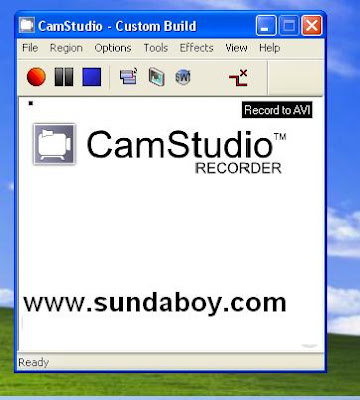
Biasanya Software ini digunakan untuk merekam segala aktivitas dan akan di upload ke internet ataupun ke youtube berikut tampilan CamStudio.

Screen Shot CamStudio
 
Gambar dari Internet

Keunggulan dari software ini adalah bisa menghasilkan kualitas gambar yang sangat bagus dikarenakan video berformat avi. Nah, sudah tidak sabar ingin mendownloadnya silahkan klik link di bawah ini.

Download CamStudio

Download Windows 8 Profesional 32 & 64 bit


Windows 8 Profesional yang electropos (Admin) bagikan sudah full versi dan sudah permanently selamanya.
Biasanya blog lain membagikan Windows 8 Profesional Edition yang trial  90 hari atau 3 bulan dan sekarang electropos akan membagikan Windows 8 Profesional Edition 32bit dan 64bit Full Version dan bukan lagi 90 hari ataupun 3 bulan. Sobat blog ane pasti sudah tahu kan Screenshoot windows 8 yang belum tau ni ane kasi screenshoot'a....


Screenshoot Windows 8 Profesional


Bagi sobat yang ingin downloadnya silahkan melalui link berikut :

Windows 8 Profesional 32bit

Windows 8 Profesional 64bit

Aktivator
Download activator windows 8

Aktivatornya 100% bisa, caranya gampang kok tinggal ekstrack saja entar Komputernya ngerestart sendiri.


Untuk menggabungkan filenya cukup extract Part1 saja dan akan otomatis yang lain akan tergabung juga.
Untuk serialnya gunakan serial yang di bawah ini...!!!

Serial Windows 8 Profesional
XKY4K-2NRWR-8F6P2-448RF-CRYQH

Serail Windows Media Player
RR3BN-3YY9P-9D7FC-7J4YF-QGJXW

Semoga Bermanfaan untuk sobat blog aneee.....!!!!! 

Download Microsoft Office 2013 + Activator


Setelah Microsoft mengeluarkan windows 8, kini juga Microsoft merilis Microsoft Office 2013 yang versi terakhirnya yaitu Microsoft Office 2010. Kali ini saya akan menshare Office 2013, yakni versi terbaru dari Office. Siapa yang gak tau software ? software yang wajib terinstall di computer (PC) untuk memudahkan pekerjaan. Office 2013 ini memiliki tampilan yang lebih elegan, dan tentunya memiliki fitur-fitur baru. Silahkan download langsung.

Gambar/Image                      Software Information                                   

Title : Microsoft Office
Date Released : 2013
Version : -
Category : Office
Size : 600 MB
Publisher : Microsoft
Format : RAR


System Requirements :
  1. 1 Ghz or faster x86- or x64-bit processor with SSE2 instruction set
  2. 1 GB RAM (32 bit), 2 GB RAM (64 bit)
  3. 3.0 GB Harddisk Available
  4. Microsoft Internet Explorer 8, 9, or 10; Mozilla Firefox 10.x or a later version; Apple Safari 5; or Google Chrome 17.x
  5. Operating System Windows 7, Windows 8, Windows Server 2008 R2, or Windows Server 2012
  6. Graphics hardware acceleration requires a DirectX10 graphics card and 1024 x 576 resolution
  7. Framework 3.5, 4.0, or 4.5
  8. Download 32bit
  9. Download 64bit
Aktivator Office 2013
Download
Serial Number
6QFDX-PYH2G-PPYFD-C7RJM-BBKQ8" atau "BDD3G-XM7FB-BD2HM-YK63V-VQFDK